Customer Master – Permanent Notes
FreshByte allows you to add permanent customer-specific notes within the Customer Master. These notes are stored at the customer level and cannot be modified from the Sales Order screen, ensuring consistent and controlled communication.
There are three types of permanent notes available:
Permanent Invoice Notes - Display on the customer’s invoice.
Permanent Picker Notes - Print on the pick ticket for the customer.
- Customer SO Note - Display on the Sales Order Screen.
How to Enter or Edit Permanent Notes
Navigate to Customers -> Customers
- Select the customer you want to edit, then click Edit.
- Go to the "Customers 2" tab.
- On the right-hand side of the screen, you will see fields for the permanent notes. Enter or update the note(s) as needed:
Invoice Note
Picker Note
SO Note
- Close the text entry window. The note field will outline in blue to indicate that the note has been entered.
- Select 'Save' to finalize the changes.
The notes are now permanently associated with the customer and will populate automatically where applicable in the system.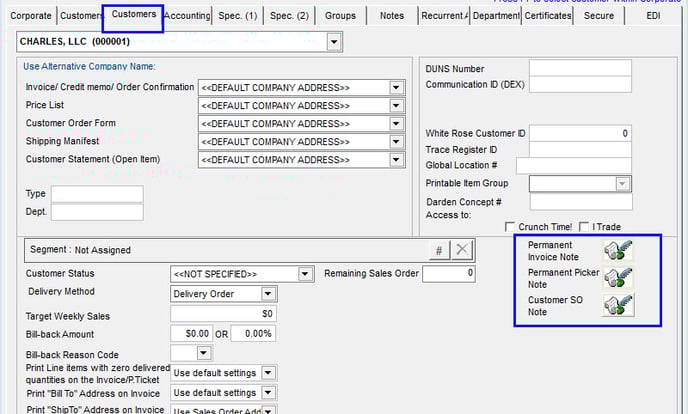
Related Articles
FreshByte Prospective Customer Feature
FreshByte includes a feature to manage prospective customers. The feature allows users to enter prospective customer information, maintain information for follow-up, and send a pricelist from the system utilizing a current active customer. Setting up ...Customer Refund Check - Sundry Checks
Customer Refund Check - Sundry Checks FreshByte provides the option to issue a Customer Refund Check if there is a Credit Memo or balance due to a customer, and the customer would like a check issued. Navigate to Vendors -> Sundry Checks -> Customer ...FreshByte Write-Off Customer Overpayments Balances
FreshByte provides the option to write off Customer Overpayments through a utility function. This feature is dependent on User Security settings. Note: A Sundry Item must be defined in System Settings to use the utility. In addition, the user has the ...Inventory -Item Master How to Create Items in FreshByte
Inventory Item Master FreshByte Software is dependent on the company setting up Inventory Items within the system for any item that the company would like to track. This includes both Inventory Items sold as well as supply items used in the packaging ...Sales Return Authorization Screen
The Return Authorization system manages returns by allowing the company to issue an RA number without immediately issuing credit. Returned items are evaluated before being returned to inventory and before any credits are issued. Credit Memos can also ...