Customer Refund Check - Sundry Checks
Navigate to Vendors -> Sundry Checks -> Customer Refund Check
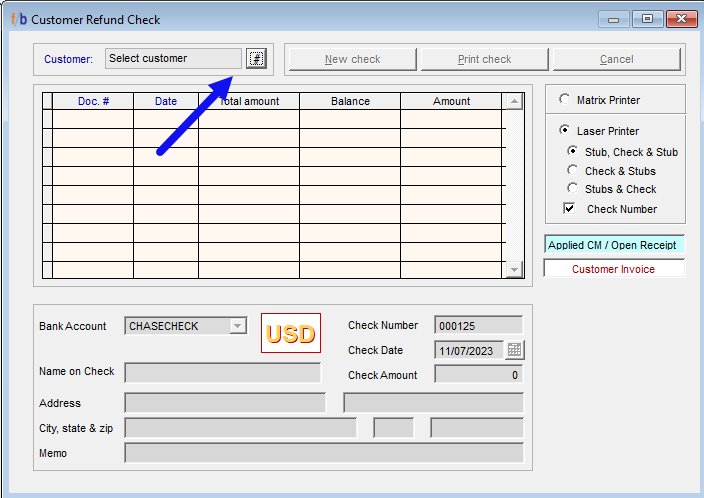
Create Sundry Check
• Select the Customer by clicking on the Hashtag to populate the customer look up.
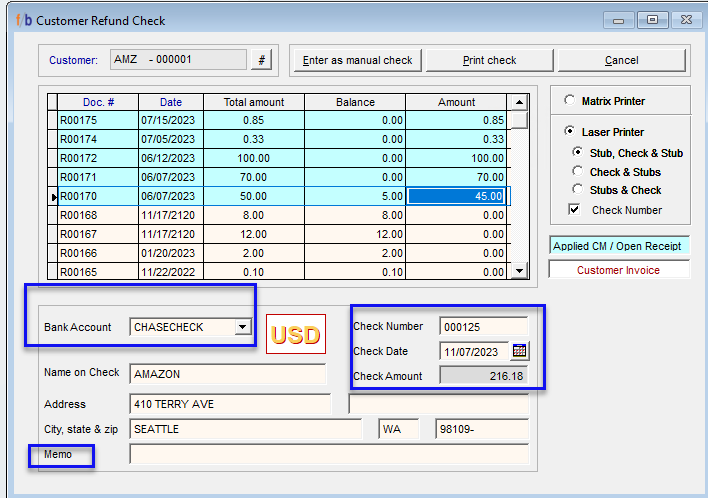
• The system displays Credit Memos and Open Receipts in black and Debit Invoices in red.
• Select New Check
• The user can only enter amounts in the Amount field of the Credit Documents in black.
• Select the Amount field and enter the amount to refund for each document number.
• The user has the option to add a partial amount in the field.
• The system highlights the line in blue as amounts are entered for the line item.
• Ensure that the bank account, the Check number, the Check Date, and the total amount are correct before proceeding.
• The name on the check can be overwritten.
Posting the Customer Refund Check
Once all information has been verified and completed, the user has the option to allow the system to print the check or the user can select manual check if the check has already been manually written to the customer.
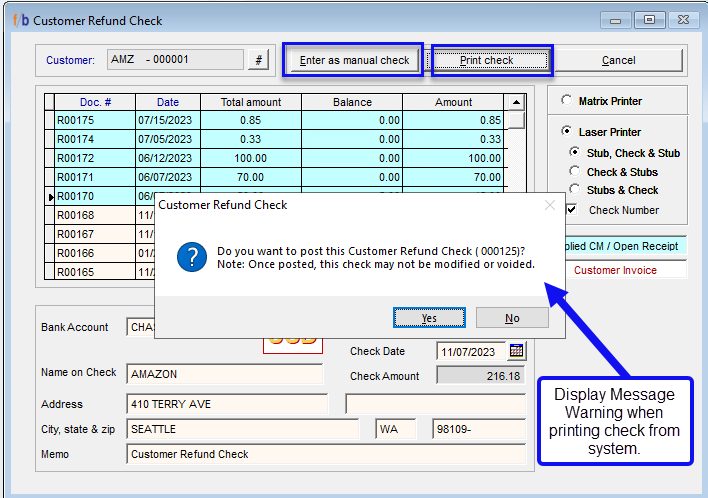
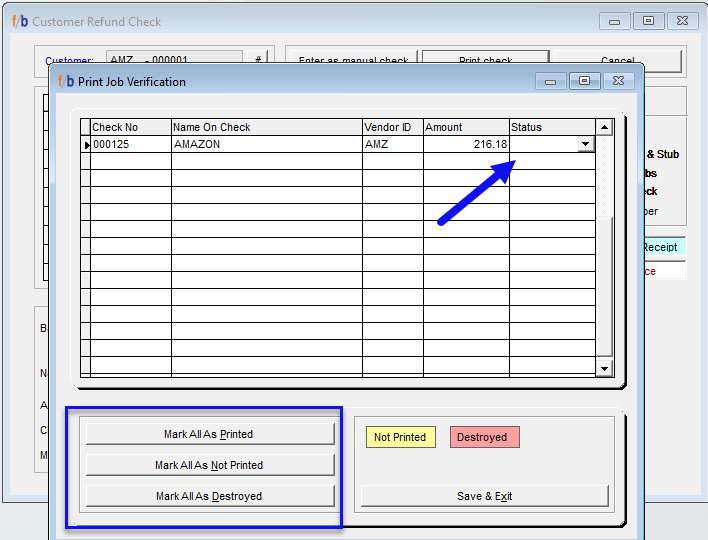
If printing from the system and all information is correct, the user selects ‘Yes’ and the Printer selection will display. Once the correct printer is selected and the tray is loaded with the check, select print, and print job verification screen will display.
The user must verify that the check has printed correctly from the printer before marking the checked as ‘Printed’.
The user has the option to mark the check as ‘Printed’ ‘Not Printed’ or ‘Destroyed’.
If the check did not print correctly, mark as ‘Not Printed’ and repeat the steps above.
Related Articles
FreshByte Apply Customer Credit Memos through the Payment/Refund Center
FreshByte provides the option to apply Customer Open Balances to Credit Memos through the Payment/Refund Center. Zero-Dollar Payments FreshByte recommends applying Customer Credit Memos and Open Receipts to Invoices through the Payment/Refund Center. ...FreshByte Credit Hold Feature
FreshByte's 'Soft Credit Hold' feature enables users to input orders for customers who have exceeded their credit terms. This feature allows administrative personnel to review orders placed on Soft Credit Hold before authorizing them for processing. ...FreshByte AR Customer/Payment Refund Import
FreshByte provides a powerful feature that allows users to directly import customer payments into the Payment/Refund Center. This feature seamlessly integrates corporate payments, open receipts, and credits, which can then be assigned to specific ...FreshByte Write-Off Customer Overpayments Balances
FreshByte provides the option to write off Customer Overpayments through a utility function. This feature is dependent on User Security settings. Note: A Sundry Item must be defined in System Settings to use the utility. In addition, the user has the ...Sales Return Authorization Screen
The Return Authorization system manages returns by allowing the company to issue an RA number without immediately issuing credit. Returned items are evaluated before being returned to inventory and before any credits are issued. Credit Memos can also ...