Sales Invoice - Sales Order lookup
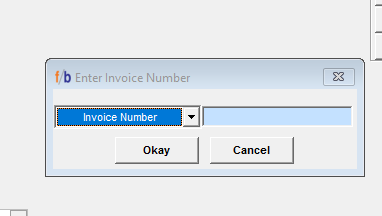
FreshByte provides the option to retrieve an Invoice or Sales Order quickly by selecting the (F7) button on the keyboard or selecting F7 on the bottom of the Sales Order Screen. If the user knows the Invoice number or Customer PO number, select (F7). A screen displays with the option to enter the Invoice number. No leading zeros are required.
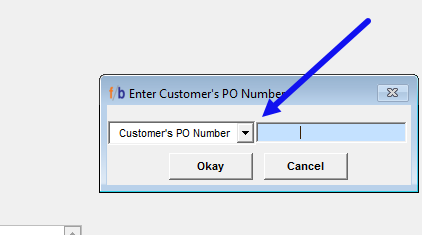
The user also has the option to retrieve the Sales order by entering the Customer PO Number. The user can switch the Invoice number lookup by selecting the down arrow and changing the lookup field to 'Customer's PO number.'
Once the Invoice or Customer PO number is entered, select 'Okay' or select the enter key on the keyboard twice to display the selected order on the sales screen. The order will display whether it is Open, Shipped, or in Billed status on the screen.
Related Articles
Sales Return Authorization Screen
The Return Authorization system manages returns by allowing the company to issue an RA number without immediately issuing credit. Returned items are evaluated before being returned to inventory and before any credits are issued. Credit Memos can also ...FreshByte 'Push Items List' Sales Orders
FreshByte includes a ‘Push Items List’ feature that provides companies the option to add a list of items that display at the time of saving the Sales Order. This tool provides a great resource to offer overstock or short-dated items. Push Items ...FreshByte Software Shortcut Key Functions
FreshByte Software | Shortcut Keys How to read this guide: ★ marks the most commonly used commands in each screen. For buttons with underlined characters in the FreshByte interface, press ALT + the underlined character to execute that command. Most ...Customer Master – Permanent Notes
FreshByte allows you to add permanent customer-specific notes within the Customer Master. These notes are stored at the customer level and cannot be modified from the Sales Order screen, ensuring consistent and controlled communication. There are ...FreshByte Credit Hold Feature
FreshByte's 'Soft Credit Hold' feature enables users to input orders for customers who have exceeded their credit terms. This feature allows administrative personnel to review orders placed on Soft Credit Hold before authorizing them for processing. ...